

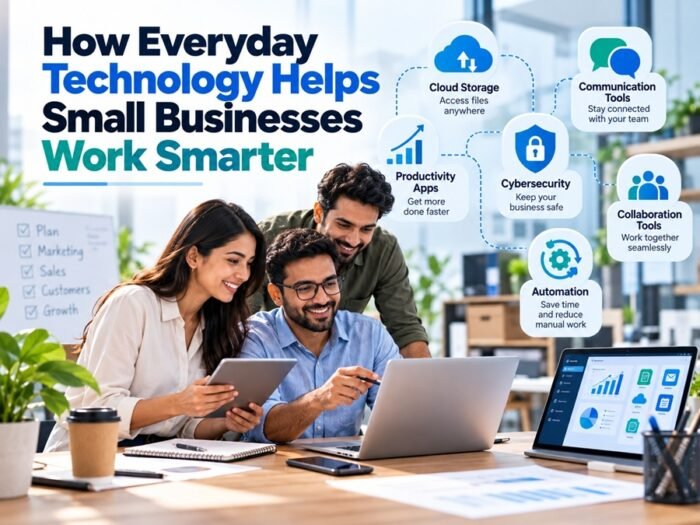
Running a small business often means juggling several responsibilities at once. One day might involve answering customer enquiries, updating product listings and organising deliveries. The next could be spent managing invoices, planning marketing campaigns or trying to find a more efficient way to handle everyday tasks.
With so much to do, even small improvements can make a noticeable difference. Everyday technology gives business owners practical ways to save time, stay organised and deliver better customer experiences without necessarily investing in expensive systems.
The real benefit is not about using the newest gadgets or adopting every digital trend. It is about choosing tools that solve genuine problems and make running a business a little easier.
Use Digital Tools to Reduce Repetitive Work
Many small businesses spend hours on tasks that follow the same pattern every week. Sending appointment reminders, preparing invoices, updating spreadsheets and responding to common questions can take attention away from more valuable work.
Digital tools can simplify some of these responsibilities. Accounting software, for example, can organise transactions, track expenses and generate invoices. Scheduling applications help business owners coordinate appointments, while email templates make it quicker to respond to routine enquiries.
Automation can also handle straightforward processes, such as sending an order confirmation after a purchase or reminding a customer about an upcoming appointment.
The key is to start with a task that repeatedly consumes time. There is little benefit in introducing a complicated system if a simple spreadsheet or shared calendar would do the job. Business owners should look for tools that are easy to maintain and that fit naturally into their existing workflow.
Improve Communication With Customers
Customers increasingly expect businesses to respond promptly and provide clear information. For a small team, meeting those expectations can be difficult when several enquiries arrive at once.
Technology can make communication more manageable. Shared inboxes allow team members to see incoming messages, customer relationship management systems help track conversations, and messaging platforms make it easier to coordinate responses internally.
A small retailer might use automated order updates to let customers know when their purchases have been dispatched. A service provider could offer online booking so clients can choose an available appointment without making several phone calls.
These changes may appear minor, but they reduce uncertainty for customers and free employees to focus on questions that require personal attention.
Automation should not replace human support entirely. Customers still need access to someone who can understand unusual circumstances, resolve complaints and provide thoughtful advice. The best systems handle routine work while making personal service easier to deliver.
Make Better Decisions With Business Data
Small business owners do not always have the time or resources to conduct extensive market research. Even so, they can use everyday digital tools to understand what is happening within their operations.
Sales reports can reveal which products perform well during particular periods. Website analytics may show which pages attract visitors, while customer feedback can highlight recurring concerns. Expense tracking tools help owners understand where money is going and identify opportunities to control costs.
Imagine a shop that notices certain products sell quickly while others remain on the shelves for months. By reviewing sales data, the owner can adjust future orders and avoid tying up too much money in slow-moving stock.
Data is most useful when it leads to a practical decision. Collecting dozens of reports without reviewing them simply creates more work. Business owners should focus on a few meaningful indicators, such as monthly revenue, repeat purchases, operating expenses and customer enquiries.
It is also worth remembering that numbers need context. A sudden increase in website traffic might not lead to more sales, and a temporary drop in revenue may reflect seasonal demand rather than a serious problem.
Choose Technology That Fits the Budget
New technology can be tempting, particularly when software providers promise faster growth or greater productivity. However, small businesses need to consider the ongoing costs as well as the advertised benefits.
Subscription fees, training, maintenance and integration can add up. A business may end up paying for features it rarely uses or introducing a platform that employees find difficult to understand.
Before purchasing a tool, identify the problem it is supposed to solve. Compare a few options, check whether a free version meets your needs and consider how easily the tool can grow with the business.
Hardware purchases deserve the same careful approach. A business that needs devices for customer service, stock management or administration should consider the required specifications, expected lifespan and available support rather than choosing solely on price.
For entrepreneurs who also want to create a more enjoyable workplace or give employees a way to unwind during breaks, entertainment technology may be worth considering separately from essential business equipment. Those exploring gaming devices for personal or recreational use can check this out to browse PlayStation consoles available through Own4Less.
Keeping business purchases and personal entertainment spending separate makes it easier to manage budgets and assess which investments genuinely support daily operations.
Support Flexible and Remote Working
Not every business needs a traditional office for employees to collaborate effectively. Cloud-based tools allow teams to access approved files, share updates and work on projects from different locations.
A shared document can reduce the confusion caused by multiple versions of the same file. Project management software helps employees see deadlines and responsibilities, while video conferencing allows businesses to speak with clients without travelling for every meeting.
These tools can be particularly useful for small companies with remote employees, freelance contributors or customers in different regions.
However, flexibility works best when expectations are clear. Team members should understand where documents are stored, which communication channels to use and how quickly they are expected to respond. Without these basic agreements, adding more applications can create confusion instead of reducing it.
Businesses should also make sure employees have appropriate access permissions and that sensitive information is not shared through unsecured channels.
Protect Business Information
As more business activity moves online, protecting information becomes a practical responsibility rather than a concern reserved for large companies.
Small businesses may hold customer contact details, supplier information, financial records and login credentials. Losing access to these records or allowing them to fall into the wrong hands can disrupt operations and damage customer confidence.
Several basic measures can reduce the risks. Use strong, unique passwords, enable multi-factor authentication where available and keep software updated. Regularly back up important files and make sure employees know how to recognise suspicious messages and unexpected requests for payment.
It is also sensible to limit access to information according to each person’s role. Not every employee needs access to every financial record or customer database.
Security does not have to begin with an expensive system. Consistent habits, clear procedures and suitable tools can provide a useful foundation. As the business grows, its security arrangements should develop alongside its operations.
Improve Marketing Without Making It Complicated
Digital marketing gives small businesses opportunities to reach potential customers without relying entirely on expensive advertising campaigns.
A well-maintained website can explain what a business offers, provide contact details and answer common questions. Social media can help companies share updates, demonstrate products and interact with customers. Email newsletters are useful for communicating with people who have chosen to receive news and offers.
The most effective approach depends on the audience. A local service provider might benefit from accurate business listings and customer reviews, while an online retailer may focus more on product pages, useful articles and email campaigns.
Technology can help track results, but businesses should avoid spreading themselves across every available platform. Maintaining two channels properly is often more useful than creating profiles everywhere and rarely updating them.
Content should also offer something worthwhile. Helpful advice, clear product information and genuine responses to customer questions are more likely to build lasting relationships than a constant stream of promotional messages.
Keep Employees Involved When Introducing New Tools
Even useful technology can fail if employees do not understand how to use it or cannot see why it is needed.
Before introducing a new system, explain the problem it is intended to solve and give staff a chance to raise concerns. A short demonstration or practical training session can help people become comfortable with the change.
It is also worth testing new tools with a small group before rolling them out across the entire business. This gives the company a chance to identify problems, refine its process and avoid unnecessary disruption.
After implementation, ask whether the tool is actually making work easier. If employees are spending more time entering information than they save through automation, the process may need to be simplified or replaced.
Technology should support the people doing the work, not create additional obstacles for them.
Review What Works and Adjust Over Time
A business does not need to get every technology decision right the first time. Needs change as the customer base grows, employees take on new responsibilities and daily operations become more complex.
Set aside time periodically to review the tools being used. Are they saving time? Are customers receiving better service? Are employees finding information more easily? Are subscription costs justified by the benefits?
If a tool is no longer useful, consider whether it can be replaced with a simpler option. If a process still causes repeated delays, investigate whether another approach would work better.
Regular reviews help businesses avoid paying for unnecessary services and ensure that technology continues to support their goals.
Conclusion
Everyday technology can help small businesses work smarter by reducing repetitive tasks, improving communication, supporting better decisions and making collaboration easier. It can also strengthen customer service and help teams protect important information.
The most successful approach is not to adopt as many tools as possible. It is to identify the biggest challenges, choose practical solutions and make sure employees can use them confidently.
Small improvements often deliver the greatest value. A better booking system, clearer sales reports or a reliable way to share files may not seem revolutionary, but together they can save time and make daily operations more manageable. For small businesses working with limited resources, that can create a stronger foundation for sustainable growth.












Leave a Reply